Upload a PDF
Choose your PDF file from the device or drop it into the upload area.
Free online PDF tool
Select one page, multiple pages, or a focused excerpt and save them as one PDF or separate PDFs in a ZIP directly in your browser.
Drop your file here or choose files. Upload one PDF file, select the pages you need and download a new PDF.
Visual guide
Use the preview as a mental model: choose files, adjust only the settings that matter, then download the final document or image output. The workflow is designed to stay simple even with many pages.
Simple workflow
Choose your PDF file from the device or drop it into the upload area.
Check the file summary, pages or options before starting the operation.
Extract Pages runs in the browser and prepares the new file locally.
Download one PDF containing the selected pages, or a ZIP with one PDF per selected page.
Practical reasons
Select important pages visually and save them into one PDF or separate PDFs without keeping the rest.
The workflow runs locally in your browser, which keeps everyday documents private and avoids an upload queue.
Use the tool from modern desktop and mobile browsers without installing a PDF app.
Built for everyday files
The file is processed on your device with client-side PDF libraries.
Review the file, pages or selected options before downloading the result.
Use the tool without sign-in, subscriptions or trial walls.
The upload, options and download states remain usable on small screens.
Downloaded files use readable names instead of generic output.pdf labels.
Invalid files, unsupported states and empty selections are reported clearly.
Perfect for
Prepare class documents, notes and shared materials without desktop software.
Handle receipts, contracts, reports and client documents in a quick browser workflow.
Prepare files for portals, email attachments and formal submissions.
Adjust visual documents, proofs or exported PDF pages before sharing them.
Work with tickets, scans, confirmations and archives from your own device.
Complete small PDF fixes from a phone or tablet when you are away from a computer.
Real workflow preview
These are real LiftPDF interface captures, not decorative mockups. They show how the page preview and final action state look during a normal browser workflow.
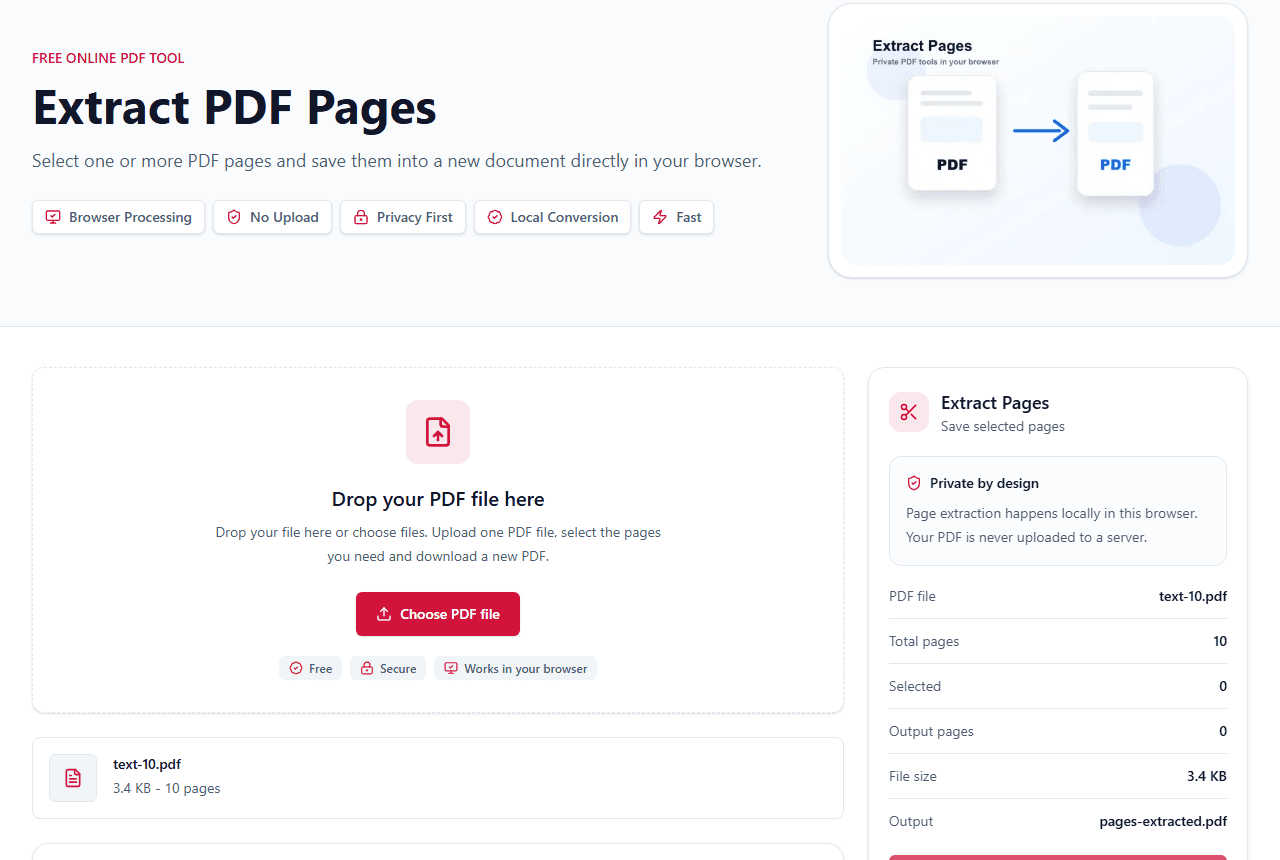
Every page is visible as a thumbnail, so you can select one page or several pages before creating a new PDF.
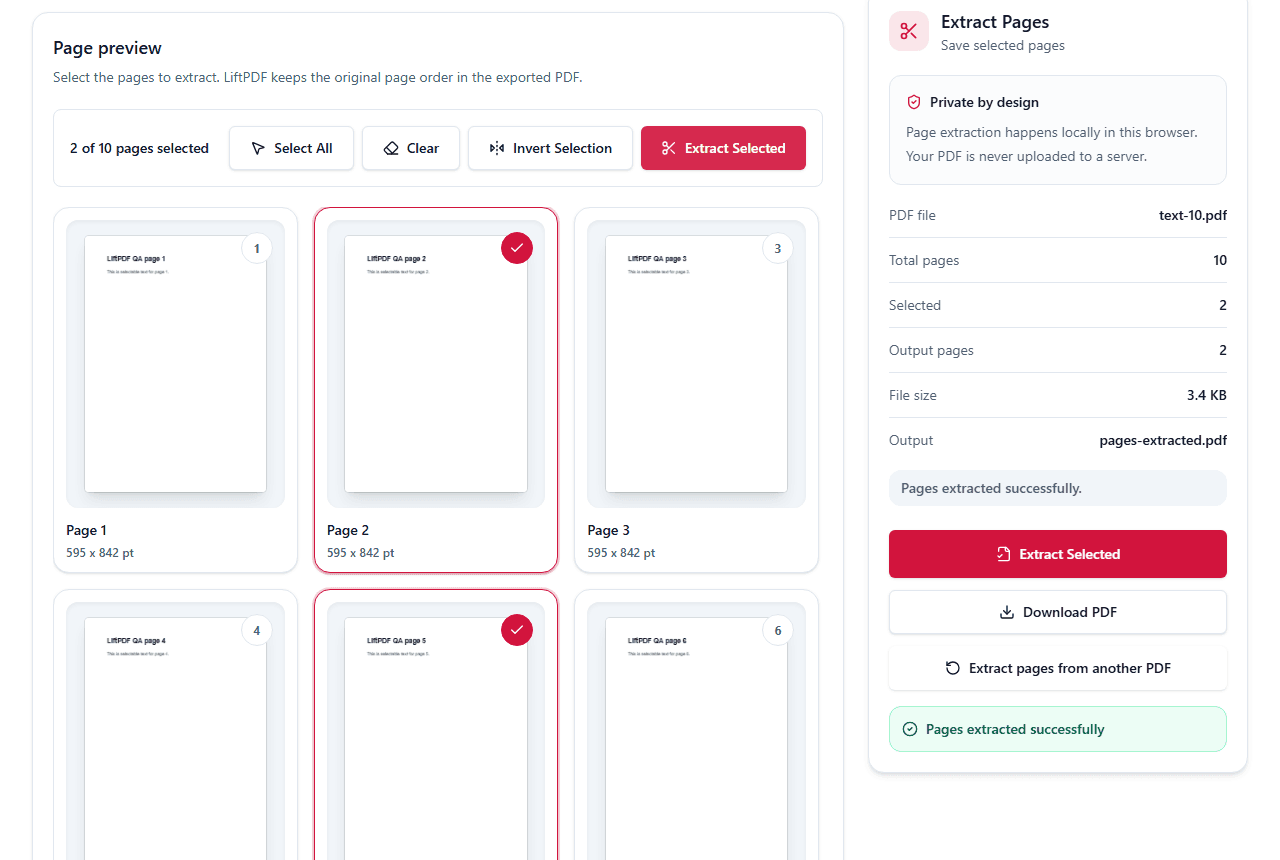
The selected pages are copied into a new PDF while the original document stays on your device.
Common problems
Select one thumbnail and export. The result is a new PDF containing only that page, which is easier to share than sending the full document.
Use the visual page grid to select pages such as 2, 5 and 8. LiftPDF keeps the selected pages in document order so the output remains predictable.
If the original page is blank, image-only, damaged or encrypted, the extracted result can appear empty. Check the preview first and unlock protected PDFs before extracting.
LiftPDF performs the page copy in your browser. You do not need Acrobat, a desktop installer or an account for basic selected-page extraction.
Complete guide
Extract Pages is useful when you need to send a few pages from a longer PDF. Selecting pages visually reduces mistakes compared with typing ranges from memory.
Use one combined PDF when the pages belong together, or separate PDFs in a ZIP when each selected page needs to become its own file.
For a single page, select only that page and download a one-page PDF. For multiple pages, select each thumbnail you need, then choose one combined PDF or separate PDF files in a ZIP.
This workflow is useful for reports, books, contracts and scanned packets where the page numbers are known but the surrounding pages should not be shared.
Privacy comparison
Keep working
Read the complete extraction workflow before using the tool.
Open toolExtract One Page From a PDFLearn the safest way to save a single page as a new PDF.
Open toolExtract Multiple PagesSave several selected pages into one clean PDF.
Open toolExtract Without AdobeUse a browser-based workflow without installing Acrobat.
Open toolDelete PagesRemove pages from the original document instead.
Open toolReorder PagesArrange pages before exporting a new version.
Open toolSplit PDFUse typed ranges or split every page.
Open toolMerge PDFCombine extracted pages with other PDFs.
Open toolLiftPDF helps you extract one page or selected pages from a PDF without Adobe Acrobat. Preview every page, choose exactly what you need and export one combined PDF or separate PDFs in a ZIP locally while preserving page order and quality.
Yes. LiftPDF lets you extract selected PDF pages for free directly in your browser.
No. The PDF is read and processed locally on your device without a backend upload.
Yes. Select one page, several pages, or all pages before exporting one combined PDF or separate PDF files in a ZIP.
Yes. Choose Separate PDFs in ZIP and LiftPDF creates one PDF file for each selected page, packaged in a ZIP download.
Upload your PDF, select only the page thumbnail you need, then export. LiftPDF creates a new one-page PDF.
Yes. LiftPDF runs in the browser and does not require Adobe Acrobat, a desktop installer, or an account.
Yes. LiftPDF shows page thumbnails so you can choose exactly which pages should be saved.
LiftPDF blocks the export and asks you to select at least one page before creating the new PDF.
No. LiftPDF copies the selected PDF pages into a new document with pdf-lib, preserving their content and quality.
Password-protected PDFs must be unlocked first with Unlock PDF before selected pages can be extracted.
Yes, if you want to copy whole pages. Scanned pages remain images inside the new PDF; OCR is only needed when you want to extract text from scans.
Blank results usually come from blank source pages, damaged PDFs, or protected files. Check the preview first and unlock encrypted PDFs before extracting.
Keep working with tools that match this PDF workflow.
Private by design
LiftPDF is built around local browser processing. For the available tools, files are read by your browser, processed on your device and downloaded back to you.
The current tools process files in your browser using client-side PDF and image libraries.
Your selected documents do not need to be sent to a LiftPDF conversion server.
Sensitive files stay on your device during conversion, editing and export.
Protect and Unlock PDF use QPDF compiled to WebAssembly for local encryption tasks.
No server upload
You choose files in your browser.
PDF.js, pdf-lib or QPDF WASM runs the task locally.
The result is created for you to save.